
TX
Trailix
Trailix is a dedicated mobile application for previewing movie trailers, targeted to help Movie goers discover new cinematic Movie Trailers and offers an uncomplicated method for pre-booking tickets
Adobe Illustrator
Graphic & Design
Adobe Photoshop
Graphic & Design
Notion
Productivity
Framer
Website & Design

Context & Problem Space
Busy moviegoers want a one-stop shop for discovering, watching trailers, buying tickets, and booking seats. which is quite challenging
Moviegoers still have to go to another app or website to buy tickets and book seats. This can be frustrating and time-consuming, especially when They are excited to see a new movie.

The Product
Trailix is a dedicated mobile application for previewing movie trailers, targeted to help Movie goers discover new cinematic Movie Trailers and offers an uncomplicated method for pre-booking tickets.
The app offers a wide variety of trailers, from popular blockbusters to independent films. Users can now browse trailers by genre, search for specific titles, Book their favorite movies and create watchlists.
Discover movies, watch trailers, and purchase tickets for any desired seat, all within the same app, saving time and effort.
RESULTS
The final design led to a 40% increase in user engagement, with clients praising the platform’s ease of use and modern look.
Boost Engagement: Keep users immersed in the movie experience by making ticket purchase a seamless extension of browsing and trailer viewing


Product Challenge
Trailix faced several challenges:
Moviegoers still have to go to another app or website to buy tickets and book seats. This can be frustrating and time-consuming, especially when They are excited to see a new movie. Busy moviegoers want a one-stop shop for discovering, watching trailers, buying tickets, and booking seats. which is quite challenging.
This cumbersome process can be frustrating, especially for busy individuals or those eager to see a new release. The excitement of finding a great movie can quickly fade amid frustrating navigation and ticket purchase roadblocks.

Solution to the problem
To Create a user-friendly dedicated app for moviegoer that allows users to easily preview movie Trailers, buy movie ticket, and Help users save time by making it easier for them to decide which movies to watch.
Convenience: Discover movies, watch trailers, and purchase tickets for any desired seat, all within the same app, saving time and effort.
Reduced Friction: Eliminate the frustration of bouncing between different platforms and struggling with unfamiliar interfaces.
Spontaneous Fun: Capture the excitement of finding a great movie by ensuring a fast and smooth path from discovery to booked seats.
Boost Engagement: Keep users immersed in the movie experience by making ticket purchase a seamless extension of browsing and trailer viewing.
PROTOTYPE
Duration: 4 weeks Team: Solo Designer (UI/UX) + Feedback from mentors
Project Timeline
A framework is always needed to come up with a suitable product. I choose to follow the Thinking Approach to guide us throughout the process. This effective process helped us research thoroughly before we dig into the problem and come up with a product solution


User goals
To Create a user-friendly dedicated app for moviegoer that allows users to easily preview movie Trailers, buy movie ticket, and Help users save time by making it easier for them to decide which movies to watch.
Research Methods
To better understand potential users , I interviewed 5 individuals. These interviews aimed to gather insights on their experiences with existing movie Trailer and movie ticketing apps, identify pain points, and gather suggestions for improvement. It became clear that smartphone users are the primary target audience for the app.

Some of the questions I asked were:
What are your favorite ways to discover new movies to watch?
How often do you use movie trailer apps?.
What are some of the challenges you face when trying to decide which movie to watch?
How often do you use movie ticketing apps?
What features or functionality would you like to see in a movie trailer app that you don't see in the apps you currently use?
Key findings derived from the interview
Working adults, students, and movie-goers have limited time to find and watch movie trailers. They often have to juggle multiple commitments, such as work, school, and family obligations. This makes it difficult for them to find the time to browse through all the trailers that are available online.
There is also a vast selection of movie trailers available online. This can be overwhelming for users, especially those who are not familiar with all the different genres and release dates.
The majority of digital spaces fail to provide suggestions for film previews and cinema ticket purchases. This results in individuals needing to dedicate substantial time to exploring trailers in search of ones that pique their interest.
Empathy Map
In creating empathy maps, I aimed to understand our users' needs and feelings to design a visually appealing and enjoyable user interface. By figuring out what captures their attention, evokes emotions, guides their actions, and reflects our brand's values, we can design visually engaging and intuitive products that resonate with them.


User Persona
Creating user personas allows us to better understand our target audience's needs, preferences, and emotions. By identifying their goals, pain points, motivations, and behaviors, we can design products that cater to their specific needs.

Competitive Analysis
I conducted a competitive Audit for both direct and indirect competitors, I looked at what they did and how well they do it, and what they could do to make it better in terms of features, visual design, accessibility and flows.

User Flow
We have identified the main tasks users will perform in the app and mapped out the steps they will take to complete each task. We have also considered any decision points or alternative paths they may encounter along the way.


Visual Design
We wanted to choose a bright and eye-pleasing color palette and readable front, as the application will be used on all phone sizes.

Ideation & Wireframes
we utilized sketching as a rapid means to visualize and shape the product concept. This allowed us to quickly iterate on ideas, providing a tangible overview of how the product would take form and a rough representation of the envisioned concepts.
Sketching out ideas on paper on how the home screen will look like, as Product designer allows me to focus on the design layout and functionality before moving on to digital wireframe. I also take into account research objective that solve user needs and business goals


Usability study: (1st Round)
Now that I have the key insights from the usability study, let's look at the findings and define the actual problems that a designer can solve.
Now that I have the key insights from the usability study, let's look at the findings and define the actual problems that a designer can solve.

Usability study: findings
Now that I have the key insights from the usability study, let's look at the findings and define the actual problems that a designer can solve.


High-Fidelity Mockups
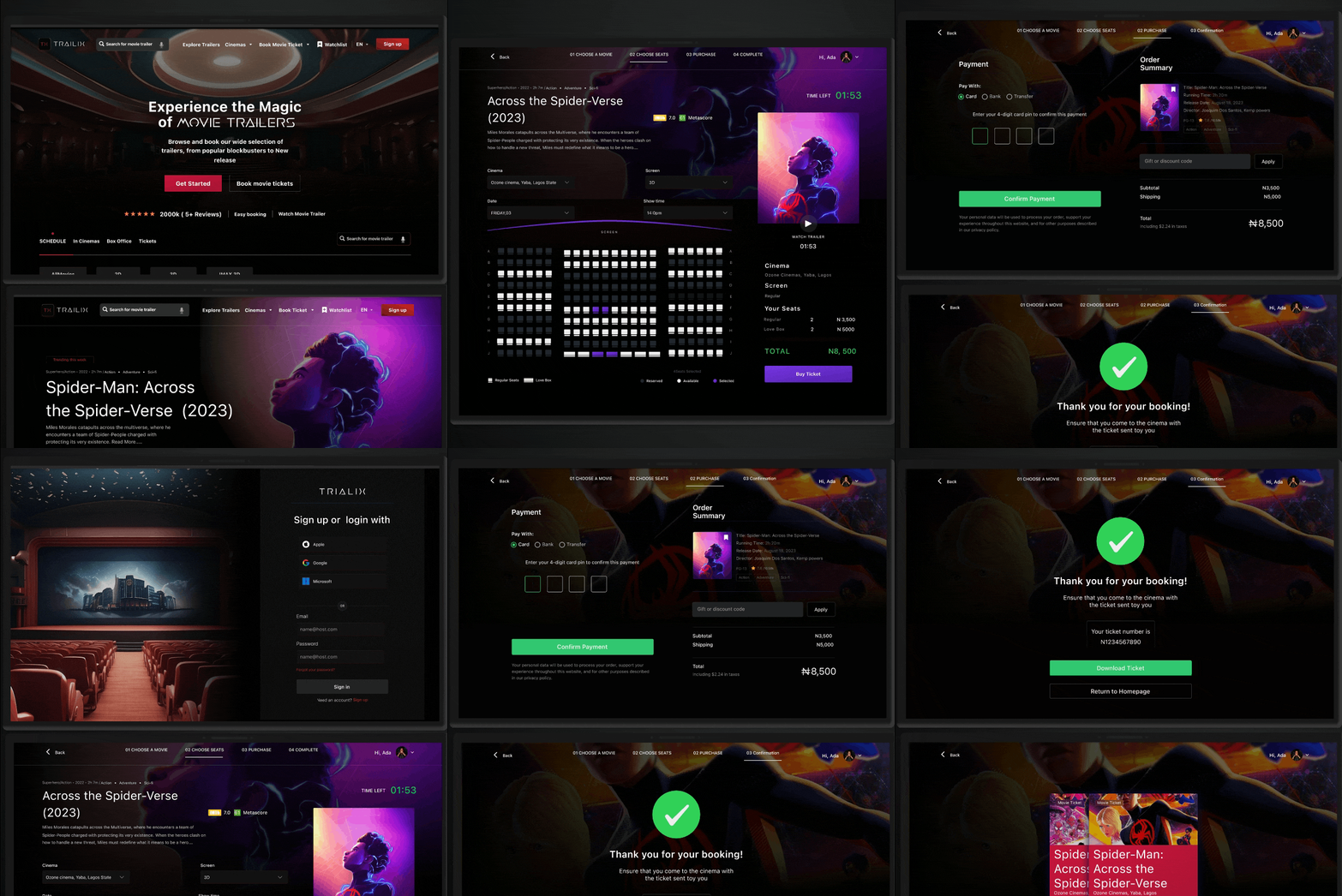
Based on the insights from the usability studies, I applied the design changes, including a clear navigation system and search and a more straightforward flow.
I made sure my screen design is based on user research's feedback and findings and being improved upon

Onboarding
Below we will take a look at the most important application screens separately.
When a user signs up the app for the first time, we introduce the benefits and features. that he can use in the application.


Homepage
The user can see all the important categories on the app’s main page, Users can select, watch their preferred trailer movie fom the home screen or use thh Search icon

Booking
Users can easily fill their details, pick a time and date, and book movie ticket to watch

Payment
Users can easily fill their details, pick a time and date, and book movie ticket to watch

PROTOTYPE
High-Fidelity Mockups
Below we will take a look at the most important application screens separately.

PROTOTYPE
Usability study: (2nd Round)
I carried out 2nd usability study, the study type is unmoderated and a participant of 5 users . In the usability findings users needs assistive technology

Usability study: findings

Accessibility considerations

Navigation and Interaction Accessibility

Reflection
In this study, I aimed to address common issues faced by users and evaluate the impact of UX design on their mood and decision-making process. Through conducting this research and design, I gained a deeper understanding of how user experience can significantly influence a user’s emotions and choices.
What I Learned:
Understanding user needs
Importance of simplicity
Accessibility considerations
Understanding and implementing
Results & Outcome

Limitations

Next steps

Other project you might like


ROLE
UX & UI
Product Strategy
Branding
Website Development
PROTOTYPE
TEAM


DURATION AND DATE
2023
2 Months